
No articles found for “”.
Bank accounts and split payroll
Every employee needs at least one bank account to receive payroll. SpireSlip also supports split payroll, sending portions of salary to multiple accounts.
Only an owner or admin can add, remove or switch an employee's bank account. An HR officer sees “You do not have permission to change bank details.”
Adding a bank account
- Open the employee's profile.
- Click the Details tab.
- Scroll to the Bank Accounts section.
- Choose the bank, enter the account number, and save.
The first account you add is automatically set as the primary account, at 100% of net pay.
Adding, removing or switching an employee's bank account, and verifying one, first asks you to confirm it is you with your password or authenticator code. Accepting an account whose name does not match the employee always asks, in the same box as the confirm button.
Multiple accounts and split payroll
Each employee can have at most three active bank accounts. More than one account needs the Plus plan or above.
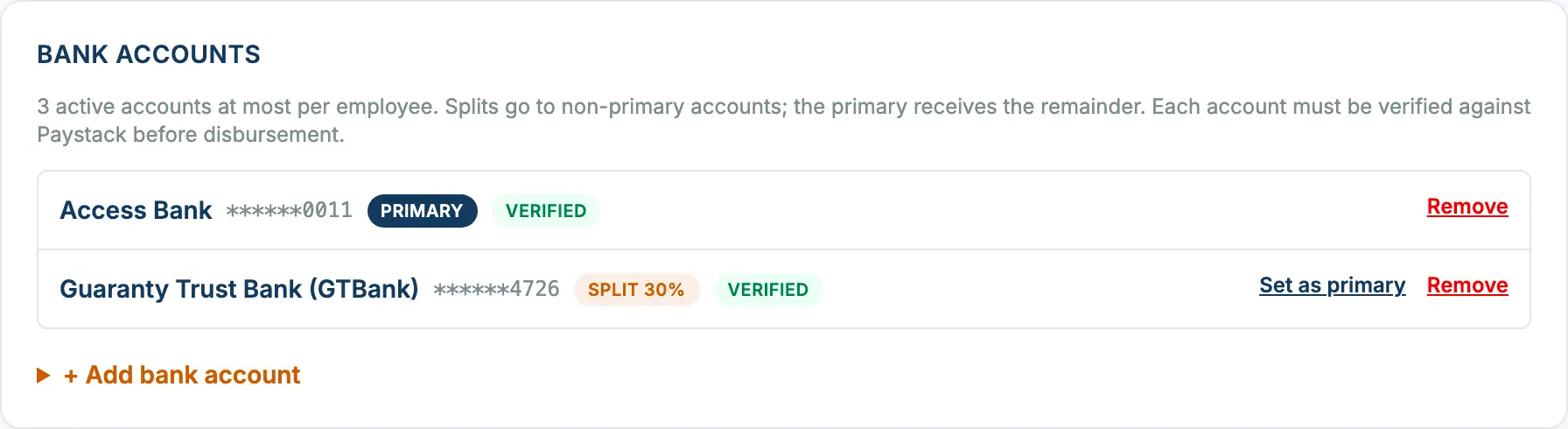
When you add a second or third account, set the split type (percentage or fixed amount) and the split value. The primary account always receives the remainder after all splits are paid, so a viewer can read the page top to bottom and know exactly what lands where.
Setting a different primary
Click Set as primary on any non-primary account to swap. When the primary changes, splits on the other accounts reset to 0, the new primary becomes a 100%-of-remainder account by default. Review the splits before the next payroll so you're sending the right amounts to the right places.
Removing an account
You cannot remove the only active account, every employee needs at least one. Add a replacement first, set it as primary, then remove the old account.
Verification and security
In the Bank accounts section of the employee's profile, an owner or admin clicks Verify next to the account. SpireSlip checks the account name through your company's payment connection and shows the name the bank returns for you to confirm. Accounts must be verified before SpireSlip can send salaries to them. If any employee on a run still has an unverified primary account, sending does not start until it is verified. A second or third account that cannot be paid yet (it is not verified, or Paystack has not set it up as a recipient) is left out of the send, and its share goes to the primary account until it can be paid. A company without a payment connection cannot verify accounts this way; it can still run payroll, issue payslips and record each run as paid outside SpireSlip, and verification is not needed for that. Accounts added by import start unverified. A company that pays from its own bank can download a file to upload there, and unverified accounts are included in it for the bank to check: see Paying salaries from your own bank. Account numbers are stored encrypted, and the interface only ever shows the last four digits after the account is saved; that bank file is the one place full numbers appear, for the account owner and admins only.